"The most important thing in the programming language is the name. A language will not succeed without a good name. I have recently invented a very good name and now I am looking for a suitable language." -- Donald Knuth
In addition to specifying how the parameters are placed on the stack as well as who is responsible for cleaning up the stack, the calling convention also dictates how the function names are decorated.Calling convention Parameters Stack cleanup -------------------------------------------------------------------- __cdecl right to left caller __stdcall right to left callee (function) __fastcall registers, right to left callee (function) __pascal left to right callee (function)
Given these 4 declarations using each of the four calling conventions:
this is how the decoration is done:int __cdecl Function1(int a, double b, float c); int __stdcall Function2(int a, double b, float c); int __fastcall Function3(int a, double b, float c); int __pascal Function4(int a, double b, float c);
_Function1
_Function2@16
@Function3@16
FUNCTION4
int __cdecl Function1(int a, double b, float c);
int __stdcall Function2(int a, double b, float c);
int __fastcall Function3(int a, double b, float c);

void main(void)
{
  Function1(1, 2.0, 3.14F);
  Function2(1, 2.0, 3.14F);
  Function3(1, 2.0, 3.14F);
  Function5(1, 2, 3, 4);
}
Sample generated asm code:Linking... main.obj : error LNK2001: unresolved external symbol @Function3@16 main.obj : error LNK2001: unresolved external symbol _Function2@16 main.obj : error LNK2001: unresolved external symbol _Function1
308:    Function1(1, 2.0, 3.14F);
004013B8   push        4048F5C3h
004013BD   push        40000000h
004013C2   push        0
004013C4   push        1
004013C6   call        @ILT+40(_Function1) (0040102d)
004013CB   add         esp,10h
309:    Function2(1, 2.0, 3.14F);
004013CE   push        4048F5C3h
004013D3   push        40000000h
004013D8   push        0
004013DA   push        1
004013DC   call        @ILT+20(_Function2@16) (00401019)
310:    Function3(1, 2.0, 3.14F);
004013E1   push        4048F5C3h
004013E6   push        40000000h
004013EB   push        0
004013ED   mov         ecx,1
004013F2   call        @ILT+0(@Function3@16) (00401005)
311:  }
and called it like this:int __fastcall Function5(int a, int b, int c, int d);
the generated assembler code looks like this:Function5(1, 2, 3, 4);
311:    Function5(1, 2, 3, 4);
00401427   push        4
00401429   push        3
0040142B   mov         edx,2
00401430   mov         ecx,1
00401435   call        @ILT+0(@Function5@16) (00401005)
From WINDEF.H
#ifdef _MAC
#define CALLBACK    PASCAL
#define WINAPI      CDECL
#define WINAPIV     CDECL
#define APIENTRY    WINAPI
#define APIPRIVATE  CDECL
#ifdef _68K_
#define PASCAL      __pascal
#else
#define PASCAL
#endif
#elif (_MSC_VER >= 800) || defined(_STDCALL_SUPPORTED)
#define CALLBACK    __stdcall
#define WINAPI      __stdcall
#define WINAPIV     __cdecl
#define APIENTRY    WINAPI
#define APIPRIVATE  __stdcall
#define PASCAL      __stdcall
#else
#define CALLBACK
#define WINAPI
#define WINAPIV
#define APIENTRY    WINAPI
#define APIPRIVATE
#define PASCAL      pascal
#endif
Notes:
int outlineAdd(int a, int b)
{
  return a + b;
}

int inlineAdd1(int a, int b)
{
 _asm
 {
    mov eax, a ; put a in reg
    add eax, b ; add b to eax, leave it in eax
 }
}

int inlineAdd2(int a, int b)
{
  _asm mov eax, a ; put a in eax
  _asm add eax, b ; add b to eax, leave it in eax
}

void main(void)
{
  int x, y, z;
  int x = inlineAdd1(3, 7);
  int y = inlineAdd2(3, 7);
  int z = outlineAdd(3, 7);
}All assembly code: (Not important to understand the inner-workings)power2(5, 3) --> 40 // 5 * 2^3 power2(3, 5) --> 96 // 3 * 2^5
PUBLIC _power2
_TEXT SEGMENT WORD PUBLIC 'CODE'
_power2 PROC

        push ebp         ; Save EBP
        mov ebp, esp     ; Move ESP into EBP so we can refer
                         ;   to arguments on the stack
        mov eax, [ebp+4] ; Get first argument
        mov ecx, [ebp+6] ; Get second argument
        shl eax, cl      ; EAX = EAX * ( 2 ^ CL )
        pop ebp          ; Restore EBP
        ret              ; Return with sum in EAX

_power2 ENDP
_TEXT   ENDS
        END
#include <stdio.h>

int power2( int num, int power )
{
   __asm
   {
      mov eax, num    ; Get first argument
      mov ecx, power  ; Get second argument
      shl eax, cl     ; EAX = EAX * ( 2 to the power of CL )
   }
}

void main( void )
{
   printf( "3 times 2 to the power of 5 is %d\n", power2(3, 5) );
}
A simple example in C only:
#include <stdio.h>

char format[] = "%s %s\n";
char hello[] = "Hello";
char world[] = "world";

void main(void)
{
  printf(format, hello, world);
}#include <stdio.h>
char format[] = "%s %s\n";
char hello[] = "Hello";
char world[] = "world";
void main( void )
{
__asm
{
mov eax, offset world
push eax
mov eax, offset hello
push eax
mov eax, offset format
push eax
call printf
//clean up the stack so that main can exit cleanly
//use the unused register ebx to do the cleanup
pop ebx
pop ebx
pop ebx
}
}
Inline Assembler documentation from MSDN.
#include <assert.h>

void main(void)
{
  int a = 3, b = 8;
  assert(a > b);
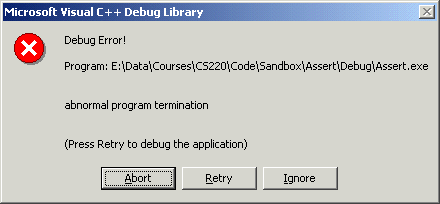
}
as well as this text to the console:
For more control over our assertions, we can define our own functionality to deal them.Assertion failed: a > b, file E:\Data\Courses\CS220\Code\Sandbox\Assert\main.c, line 42
#ifdef _DEBUG
  #define ASSERT(expr)                                \
  if (!(expr)){                                       \
    fflush(stdout);                                   \
    fprintf(stderr, "Assertion failed: %s\n", #expr); \
    fprintf(stderr, "  File: %s\n", __FILE__);        \
    fprintf(stderr, "  Line: %i\n", __LINE__);        \
    fprintf(stderr, "  Last compiled on %s at %s\n",  \
                     __DATE__, __TIME__);             \
    fflush(stderr);                                   \
    exit(1);                                          \
  }                                                   \
  else
#else
  #define ASSERT(expr)
#endif
Now, this program:
void main(void)
{
  int a = 3, b = 8;
  ASSERT( (a > b) && (a - b < 0) );
}
This program:Assertion failed: (a > b) && (a - b < 0) File: E:\Data\Courses\Notes\CS220\Code\Sandbox\Assert\main.c Line: 57 Last compiled on Jul 22 2004 at 08:29:25
void main(void)
{
  char *word = "hello";
  ASSERT( !stricmp("one", word) );
}
Assertion failed: !stricmp("one", word)
  File: E:\Data\Courses\Notes\CS220\Code\Sandbox\Assert\main.c
  Line: 59
to suppress this warning:#pragma warning(disable: 4001)
warning C4001: nonstandard extension 'single line comment' was used
The intrinsic pragma causes the compiler to insert "built-in" functions into the code instead of generating a function call. (Somewhat like inline functions in C++.)
For example, this code:#pragma intrinsic( function1 [, function2, ...] )
would normally generate instructions similar to these:memcpy(destination, source, count);
mov         eax,dword ptr [ebp+10h]  ; push count
push        eax                      ;
mov         ecx,dword ptr [ebp-8]    ; push source
push        ecx                      ;
mov         edx,dword ptr [ebp-4]    ; push destination
push        edx                      ;
call        memcpy (0040d950)        ; call memcpy to do the work
add         esp,0Ch
the compiler would generate code that inserts the memcpy functionality directly into the code, instead of calling the function:#pragma intrinsic( memcpy )
mov         ecx,dword ptr [ebp+10h]         ; count
mov         esi,dword ptr [ebp-8]           ; source
mov         edi,dword ptr [ebp-4]           ; destination
mov         eax,ecx
shr         ecx,2                           ; 1 DWORD = 4 bytes
rep movs    dword ptr [edi],dword ptr [esi] ; copy (count / 4) DWORDs
mov         ecx,eax
and         ecx,3
rep movs    byte ptr [edi],byte ptr [esi]   ; copy any remaining bytes
More pragmas on MSDN.
void TestMalloc(int size)
{
  int *a;
  double *b;

  a = malloc(size * sizeof(int));
  b = malloc(size * sizeof(double));

  free(a);
  free(b);
}

void TestAlloc(int size)
{
  int *a;
  double *b;

  a = _alloca(size * sizeof(int));
  b = _alloca(size * sizeof(double));
}A macro to dynamically allocate a two-dimensional array on the stack:malloc time: 609 (500 bytes) _alloc time: 16 (500 bytes) malloc time: 625 (1000 bytes) _alloc time: 15 (1000 bytes) malloc time: 625 (2000 bytes) _alloc time: 16 (2000 bytes) malloc time: 609 (3000 bytes) _alloc time: 16 (3000 bytes) malloc time: 984 (10000 bytes) _alloc time: 94 (10000 bytes) malloc time: 968 (20000 bytes) _alloc time: 172 (20000 bytes) malloc time: 985 (30000 bytes) _alloc time: 703 (30000 bytes) malloc time: 969 (40000 bytes) _alloc time: 1062 (40000 bytes) malloc time: 875 (50000 bytes) _alloc time: 1547 (50000 bytes) malloc time: 875 (60000 bytes) _alloc time: 3750 (60000 bytes) malloc time: 8625 (70000 bytes) _alloc time: 5844 (70000 bytes)
#define \
ALLOC_ARRAY2D(prow, row, col, type)                       \
{                                                         \
  type *pdata;                                            \
  int i;                                                  \
  pdata = (type *) _alloca(row * col * sizeof(type));     \
  if (pdata == (type *)NULL)                              \
  {                                                       \
    fprintf(stderr, "No stack space for data\n");         \
    exit(1);                                              \
  }                                                       \
  prow = (type **) _alloca(row *sizeof(type *));          \
  if (prow == (type **)NULL)                              \
  {                                                       \
    fprintf(stderr, "No stack space for row pointers\n"); \
    exit(1);                                              \
  }                                                       \
  for (i = 0; i < row; i++)                               \
  {                                                       \
    prow[i] = pdata;                                      \
    pdata += col;                                         \
  }                                                       \
}
void TestAlloc2D(int rows, int cols)
{
  int **a;
  double **b;

    /* Allocate a and b on the stack */
  ALLOC_ARRAY2D(a, rows, cols, int);
  ALLOC_ARRAY2D(b, rows, cols, double);

  /* use a and b here...     */
  /* don't have to free them */
}