| The "General" page | The "Programs" page | |
|---|---|---|

|

|
Session #6
Continuing from the last session, I've added a very useful feature that most applications support: The ability to remember settings between invocations. Plainly put, this means that, if you make changes to some of the settings in the program and then exit, the next time you run the program, those settings are the same. You won't "lose" the settings when you quit the program. This is done by saving the current settings to a file.This mechanism has been around since the beginning of Windows and the files are called INI files (pronounced: eye-en-eye or innee). These files have a simple and well-known format and should be used as an alternative to the failed-experiment known as the "Windows registry". (Contrary to what the article says.) Follow the previous link for a refresher on the structure of these files.
Using properties to access private data Properties have been around in CodeGear products since the early 1990's. They have recently gained wide popularity with C#. (Incidentally, the person that architected C# is the same person that architected Delphi. Delphi is the tool after which both C# and Turbo C++ are designed. The person's name is Anders Hejlsberg.) Properties give the user a cleaner syntax for reading/writing data of an object. Here's a sample:
Creating a class that holds the application's configuration. We created a class based on TForm called TfrmConfig that contains all of the user's settings. (These are also called "Preferences" in other applications.) This class also has a UI so that the user can modify these settings. This class is responsible for displaying a window for the user to change the settings. It will also persist these settings to a file before the program ends. The class will read the saved settings from disk when the application starts. See the source code for the details. We will add more to the configuration dialog as the application progresses.In the header file:
In the implementation file:private: bool FGridEnabled; short FDefaultRowCount; void SetDefaultRowCount(short RowCount); // To set FDefaultRowCount public: __property bool GridEnabled = {read=FGridEnabled, write=FGridEnabled}; __property short DefaultRowCount = {read=FDefaultRowCount, write=SetDefaultRowCount};void TfrmConfig::SetDefaultRowCount(short RowCount) { // Constrain the new value short minrows = std::min(RowCount, MAX_ROW_COUNT); FDefaultRowCount = std::max(minrows, MIN_ROW_COUNT); }
The bulk of the work is done in these two methods:
The "General" page The "Programs" page
  // Copy the values from the UI components to the private member fields.
  // This is called after the user makes changes and clicks the "OK" button.
void TfrmConfig::DialogToFields(void)
{
  GameExecutable = edtGameExecutable->Text;
  GridEnabled = chkGridEnabled->Checked;
  DefaultRowCount = (short) StrToInt(edtRows->Text);
  DefaultColCount = (short) StrToInt(edtColumns->Text);
}

  // Copy the values of the private member fields to the UI components.
  // This is done when the UI is shown to the user. It can also be called
  // after the user has made changes, but then clicks the "Cancel" button.
void TfrmConfig::FieldsToDialog(void)
{
  edtGameExecutable->Text = GameExecutable;
  chkGridEnabled->Checked = GridEnabled;
  spnRows->Position = DefaultRowCount;
  spnColumns->Position = DefaultColCount;

}
The bulk of the work is done in these methods in the configuration class:
// Read the saved settings from the .ini file.
void TfrmConfig::LoadSettings(void)
{
    // TMemIniFile is a buffered ini file
  AnsiString filename = ExtractFilePath(ParamStr(0)) + FConfigFilename;
  TMemIniFile *inifile = new TMemIniFile(filename);

  GameExecutable = inifile->ReadString("Programs", "GameExecutable", "");
  GridEnabled = inifile->ReadBool("General", "GridEnabled", 0);
  DefaultRowCount = (short)inifile->ReadInteger("General", "DefaultRowCount", DEFAULT_ROW_COUNT);

  FieldsToDialog();
  delete inifile;
}

// Write the current settings to the .ini file.
void TfrmConfig::SaveSettings(void)
{
    // TMemIniFile is a buffered ini file
  AnsiString filename = ExtractFilePath(ParamStr(0)) + FConfigFilename;
  TMemIniFile *inifile = new TMemIniFile(filename);

  inifile->WriteString("Programs", "ExecutableFile", GameExecutable);
  inifile->WriteBool("General", "GridEnabled", GridEnabled);
  inifile->WriteInteger("General", "DefaultRowCount", DefaultRowCount);
  inifile->UpdateFile(); // Flush the buffer to disk before deleting!!!

  delete inifile;
}
void TfrmConfig::SetGameExecutable(const AnsiString &exe)
{
    // Make sure that the file is valid
  if (FileExists(exe))
    FGameExecutable = exe;
  else // otherwise, display an error message
  {
    TMsgDlgButtons btns;
    btns << mbOK << mbCancel << mbHelp;
    MessageDlg(exe + " is not a valid filename.", mtError, btns, 0);
  }
}
See the online help for MessageDlg and how to use it: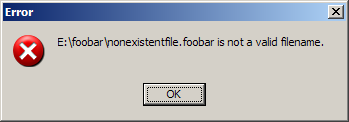
const char *m = "You can put\n\nnewlines in\nthe "
                "message\n\n\nas well as\ttabs\ttabs\ttabs\n"
                "\n\nBut I wouldn't recommend a lot of buttons.";

TMsgDlgButtons btns;
btns << mbOK << mbYes << mbCancel
     << mbAbort << mbNo << mbRetry
     << mbIgnore << mbYesToAll << mbNoToAll;

MessageDlg(m, mtWarning, btns, 0);
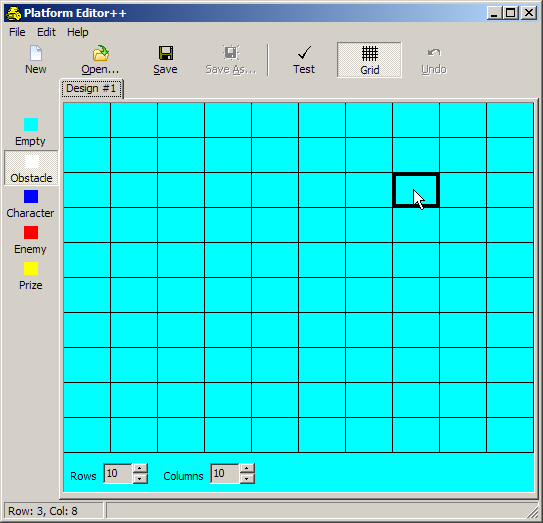
Here's the current UI:
Here's another project that shows the use of .ini files to load and save application configuration settings. It's simpler than the one above in that it only deals with saving/loading the values. It uses TIniFile instead of TMemIniFile and it doesn't use properties or worry about the user "canceling" the dialog box after making changes. It also doesn't use exception handling when reading/writing the .ini files. See the source code for details.
| The application | The .ini file contents | |
|---|---|---|

|
[General] Width=365 Height=285 Top=173 Left=787 Title=This is the title Description=This is the description [Level] Map=4 Spectre=1 Arachnotron=1 Mancubus=1 SpectreCount=10 ArachnotronCount=15 MancubusCount=7 |
Exercises